


Just received my first payment — £280 direct to my account. No escrow, no waiting. The client approved my AI workflow automation deliverable this morning. This is real.
🔥 47
💬 12 comments

Ah, spreadsheets.
Love them or hate them, spreadsheets are surprisingly useful. Most people never truly get to grips with the many sophisticated things a spreadsheet can do, such as pivot tables, power queries, macros, and simulations. To be honest, though, unless you are the Chancellor of the Exchequer, it’s unlikely you’ll need all but the basic features.
OK, so we have established that spreadsheets are great, but how do they stack up against property management software?
Good question!
In this article, we are going to discuss whether using spreadsheets is a viable property management option for landlords. We’ll also take a brief look at the pros and cons of landlord software, as well as other property management options.
There are different spreadsheet programs out there. Choose the one that best suits your number-crunching budget…
Microsoft includes Excel spreadsheets as part of its “Office” package. If you want the latest version of Excel, you’ll need to pay a monthly subscription fee for the cloud-based Office 365. This can work out quite expensive over time, but it does give you access to the most recent iterations of Office applications. The student version is the cheapest way to subscribe to MS Office 365, but you need a college or university email address to qualify for a student licence.
With an online subscription to Excel, you can invite others to view and collaborate on your spreadsheets.
If you love MS Office but don’t want to fork out for a monthly subscription, look for an older version of MS Office. Office 2010 is readily available on sites like eBay for less than a fiver.
Google’s productivity suite also includes a spreadsheet program, and unlike MS Office, it is free to use. Google Sheets is very similar to MS Excel. It’s a cloud-based application. This is useful, as anything you do on a Google Sheet is automatically saved.
If you need to work with anyone, Google makes it nice and easy. Google spreadsheets can be shared with other people. Give them a link so they can view or edit your sheet. There is also a useful “history” feature that allows you to go back in time and view/restore older versions of your spreadsheet.
The other two versions worth considering are Apple Numbers and Libra Office. Apple Numbers might work for you if you use a MacBook or iPad. Libra Office is an open-source productivity suite that includes a spreadsheet program: Calc.
These aren’t the only options open to you, but this article is about whether spreadsheets should be used for property management, not which provider you should use! If we were to list them all we’d be here all day. Here you’ll find an in depth spreadsheet software comparison if you’d like more options.
When deciding which is the best system to use for property management you should consider what kind of information you need to record. There may be some information you need to collate on an ongoing basis for instance:
Income and expenditure for each property
Other financial data – such as property valuations, deposits, mortgage payments and interest etc.
Maintenance requests and a list of ongoing maintenance tasks
Other information you might need to store, but just update now and again includes:
Images of the property and descriptions for marketing the property
Information about your tenants i.e. contact details, id documents, occupation etc.
Details of your insurances and saftety certificates and when they’re due to expire
Contact details and other details relating to your suppliers
Tenancy details i.e. tenancy agreement, date tenancy is due to expire etc.
Data relating to new tenants – i.e. tenant application forms and any data prospective tenants share.
This is not an exhaustive list and if you use a letting agent you might not need to record some of this. When deciding which system to use though it’s important to know what you want to record and how you’re going to record it.
If you’re planning to use a property management software you should make sure it can help you record this data. Some property management software is very basic and will allow you to just monitor the basics. Some programmes are a lot more in depth and aim to help you manage everything all in one place.
If you’re planning to use a spreadsheet you should think about how this kind of system can help you keep on top of everything. For instance it’s common to use one spreadsheet for information you need to monitor on an ongoing basis. You might want to use separate spreadsheets for everything, or use one spreadsheet and make use of multiple tabs and a calendar system for task management. There’s no wrong answer here, everyone works differently. But you should consider the kind of information you want to store and think about how you’ll store it to help you determine what kind of system is best for you.
Setting up a spreadsheet takes a bit of effort. you Should include as much or as little data as you need to track everything. A simple chart would include three columns for income and three columns for expenses.
It is pretty easy to create a double-entry bookkeeping-style table for monthly income and expenses. This requires very little skill and no knowledge of formulas.
See below for an example table you could use for one or two properties.

Here’s an example of a simple income and expenditure table.
As you can see, all you need to do is record the date of each transaction, a brief description, and the amount. As long as you keep invoices and receipts, this would be enough for an accountant to make sense of your business transactions or for you to fill in your self-assessment form.
If you don’t relish the idea of putting together your own property management spreadsheet, or you’d like one that at least does some of the number crunching for you, download a free template.
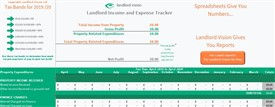
The Landlord Vision income and expenditure spreadsheet for landlords is free to download, easy to use and has been downloaded over 6500 times this year alone! You can use this to help you easily prepare your tax return and as a prompt for many aspects of property management.
First, the pros.
Spreadsheets are a flexible and infinitely useful tool. A spreadsheet can perform complex calculations quickly and easily. Once you have a simple template set up, all you need to do is fill in the data and the spreadsheet will do the rest.
You can print a spreadsheet to a PDF file and email the document to your accountant, or in the case of a cloud-based spreadsheet, share it with someone.
A spreadsheet is perfect for landlords with very few properties. It’s not difficult to track minimal income and expenditure on a spreadsheet when you have one or two properties. Watch a few YouTube videos if you need to learn how to master the intricacies of Excel or Google Sheets. Unless you have a burning desire to get to grips with Pivot Tables, it won’t take you too long to feel comfortable using a spreadsheet.
And now the cons.
As your portfolio grows, spreadsheets may lose their allure. The more complex your property management needs become, the harder it will be to keep track of your income and expenditure on a simple spreadsheet. And unless you install a software plug-in, spreadsheet programs like Excel are incompatible with Making Tax Digital.
Data input into a spreadsheet is also rather repetitive. Each transaction must be manually recorded, which increases the likelihood of errors creeping into your accounts. Nobody likes errors, least of all HMRC.
Collaborating on spreadsheets is a potential security risk. In addition, if you give other people access to your spreadsheets, there is a risk they accidentally delete critical data or edit it so it’s incorrect.
So, let’s look at how useful property management software is in comparison.
The clue is in the name. Property management software goes above and beyond bookkeeping. Most property management software packages include accounting features, but the main selling point is that you can use the software to track all aspects of property management, from rent collection and maintenance to communicating with tenants and suppliers. It’s a one-stop-shop for landlords.
Like spreadsheets, there are pros and cons to using property management software…
Here are the pros.
Property management software comes into its own when you have a larger portfolio. It’s hard work managing multiple properties. There’s a lot of time, effort and admin involved, and if you’re not incredibly organised, you could miss something critical, like a boiler service, gas safety check etc.
Spreadsheets are useful for recording information, but they don’t send out alerts if a tenant is late with their rent or a property is overdue an inspection. If you own one or two properties, you can probably work around this, using a smartphone app or calendar as a diary and cross-referencing with your spreadsheet. However, this is not a time-efficient way to run a growing business.
Property management software saves time and reduces admin. Instead of juggling different interfaces, such as Excel for your accounts and a messaging app for contacting tenants, you have all the tools you need inside one interface. Keep your accounts in order, submit information to HMRC, and chat with tenants at the same time. For a busy landlord, this is a huge advantage. And if the software you use is cloud-based, you can run your portfolio from anywhere.
Data inputting is a lot easier with property management software. Repeat transactions don’t need to be manually added each week/month. Data fields will be automatically populated once key information has been added to the system. You can export data, create reports, and see at a glance how profitable your portfolio is.
There are also some downsides to using property management software.
As with any software application, including spreadsheets, there is a learning curve. Don’t expect to get to grips with a new software package immediately. It will take time to figure out how it works and what the shortcuts are.
There is also a cost. In some cases, subscribing to a property management software package can be more expensive than using a spreadsheet application. There will either be an upfront cost or a monthly subscription charge. If you only have one or two properties, you may not be able to justify the extra expense, although it is tax-deductible, of course!
Not all property management software providers are created equal. While the best property management software is an all in one solution that allows you to manage all elements of your property this isn’t always the case. You’ll find some providers offer modular software, meaning you have to pay for each of the different elements of the software. Some provide a good platform for property management but require you to purchase a subscription to a financial package as well. Good landlord software (like Landlord Vision 😉 ) is reasonably priced and doesn’t require you to purchase add ons to manage different elements of your property.
You do have other options. If you want to do things ‘old school’, pick up a ledger from WHSmith and start recording your property related transactions on paper. Combined with a rent book and a calculator, it might work just fine for you. Until Making Tax Digital arrives of course!

The other common property management option is to outsource property management to a letting agent. They will do all the legwork for you and you can – in theory – relax. Don’t forget also that letting agents charge 10-15% of the monthly rent they collect for their services, and potentially more if you are in London.
Smaller landlords or ‘accidental’ landlords should be fine using spreadsheets to manage their properties. There will be fewer transactions to record and less admin to worry about. Create your own spreadsheet or download a template. It’s relatively easy to maintain a simple spreadsheet and your accountant can export the data for year-end tax returns. So, if you are new to the buy to let sector, start off with a spreadsheet to manage your rental income and expenditure. It should do you just fine for a while.
Professional landlords can really benefit from investing in property management software. The extra features will save you time and it’s a lot easier to run a property rental business when you use bespoke landlord software.
The more properties you own, the more landlord software will help you. It makes more sense to invest in property management software than to give away 10-15% of your rental income to a letting agent. However, don’t rush in and buy the first software package you come across. Take advantage of free trials and read user reviews. Make sure the package you want offers all the features you need, such as MTD integration. Check whether the provider offers tech support and is available to answer questions you may have. It’s pointless upgrading to landlord software if you can’t make it work properly or get the support you need to get started.
Do you use spreadsheets or landlord software? Tell us which one works best for you. We’d love to hear your thoughts on the subject. You can leave a comment below or connect with us on social media.
Read More Like This:
Letting Agent Fees the Ultimate Guide
7 Things Landlords are Missing From Their Spreadsheets
These are your future squad members. They are already inside the Sprint — building, delivering, and getting paid.
489 members · Public Group · WorkTravel Academy
Just received my first payment — £280 direct to my account. No escrow, no waiting. The client approved my AI workflow automation deliverable this morning. This is real.
Blockchain credential issued. Week 4 complete. My SkillBridge AI profile now shows 2 verified deliverables. Already been matched to a second project — starting Monday.
Squad Lead reviewed my first submission. Feedback was specific and actually useful — not generic. Already know exactly what to fix for Week 2. This is the mentorship I couldn't find anywhere else.
Applied to 50+ jobs last year. Zero responses. Joined the Sprint 4 weeks ago. Now I have 2 paid deliverables, a blockchain credential, and a second project offer. The CV is dead. Proof is everything.
They were exactly where you are now — skilled, invisible, frustrated.
They chose to build proof instead of sending more CVs.
Free for qualified members · 10–20 hrs/week · Results in 4 weeks
Your brief becomes a live, SEO-optimised project page on WorkTravel.Agency — proof of your work, not just a claim.
We've received your brief and will send your live project page link to your email within 24 hours.
Your project will appear at:
worktravel.agency/projects/[your-location]
Your Group is your project landing page. It's where your squad collaborates, where Sponsors discover you, and where you earn your first Academy Credits. Create it now — it takes 2 minutes.
+ Create Your Project GroupAlready have a group? Browse all groups
Access 45+ podcast episodes and 100+ project-based learning videos. Every completed lesson earns you Academy Credits toward your next tier.
45 episodes covering AI operations, remote work strategy, and enterprise AI adoption. Real conversations with practitioners.
45 EpisodesShort, practical videos on AI operator skills. Perfect for building your AI toolkit step by step.
100+ VideosThis 5-minute episode is the fastest way to understand what WorkTravel Academy is about and why project-based AI learning beats certificates every time.
Watch the Podcast →From free Explorer to full White Label Partner — every tier includes Academy Credits, community access, and a verifiable AI project portfolio. All plans include the MiniMax Bonus System.
| Feature | Explorer | Builder | Verified | Squad Lead |
|---|---|---|---|---|
| Monthly Academy Credits | 100 (join) | 500 | 1,000 (once) | 2,000 |
| Community Access | ✓ | ✓ | ✓ | ✓ |
| Project-Based Learning Tracks | — | ✓ | ✓ | ✓ |
| Verifiable Portfolio Badge | — | ✓ | ✓ | ✓ |
| Official Verified Status | — | — | ✓ | ✓ |
| Enterprise Tool Discounts | — | ✓ | ✓ | ✓ |
| MiniMax Bonus System | Basic | Full | Full | Full + Mentor |
| Referral Commission | — | ✓ | ✓ | ✓ + Override |
| Enterprise Affiliation Bonus | — | — | — | ✓ |
| Mentor Revenue Share | — | — | — | ✓ |
| Sponsor Directory Listing | — | — | Priority | Featured |
| Price | Free | $7/mo | $99 once | $99/mo |
As a Squad Lead or Verified member, you can earn recurring commissions by recommending the enterprise tools your team already uses. Every referral earns you Academy Credits and real cash commissions — paid directly by our partners.
The Enterprise Affiliation Bonus Track is available to Squad Lead and Verified members.
Choose from our vetted list of enterprise AI and automation platforms.
Use your unique referral link in your project groups, blog posts, and client proposals.
Earn Academy Credits for every referral, plus direct commissions from the partner platform.
The Enterprise Affiliation Bonus Track is available to members on the Squad Lead plan ($99/month) or those who have achieved Verified status ($99 one-time). Upgrade today to unlock your referral links and start earning recurring commissions from the tools you already recommend.
Upgrade to Squad Lead →Understand how Credits, Projects, and the Bonus System work together.
Comments